Cells in a Range on an Excel Sheet - Practice Coding | SlaveCode
0
0123456789
0
0123456789
:
0
0123456789
0
0123456789
2194. Cells in a Range on an Excel Sheet
Easy
10 Points
String
A cell (r, c) of an excel sheet is represented as a string "
" where:
You are given a string s in the format ":", where represents the column c1, represents the row r1, represents the column c2, and represents the row r2, such that r1 <= r2 and c1 <= c2.
Return the list of cells (x, y) such that r1 <= x <= r2 and c1 <= y <= c2. The cells should be represented as strings in the format mentioned above and be sorted in non-decreasing order first by columns and then by rows.
Examples
Example 1
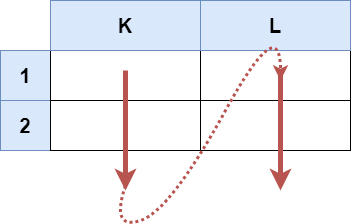
Input: s = "K1:L2"
Output: ["K1","K2","L1","L2"]
Explanation:
The above diagram shows the cells which should be present in the list.
The red arrows denote the order in which the cells should be presented.
Example 2
Input: s = "A1:F1"
Output: ["A1","B1","C1","D1","E1","F1"]
Explanation:
The above diagram shows the cells which should be present in the list.
The red arrow denotes the order in which the cells should be presented.
Constraints
s.length == 5
'A' <= s[0] <= s[3] <= 'Z'
'1' <= s[1] <= s[4] <= '9'
s consists of uppercase English letters, digits and ':'.
2194. Cells in a Range on an Excel Sheet
Easy
10 Points
String
A cell (r, c) of an excel sheet is represented as a string "
" where:
You are given a string s in the format ":", where represents the column c1, represents the row r1, represents the column c2, and represents the row r2, such that r1 <= r2 and c1 <= c2.
Return the list of cells (x, y) such that r1 <= x <= r2 and c1 <= y <= c2. The cells should be represented as strings in the format mentioned above and be sorted in non-decreasing order first by columns and then by rows.
Examples
Example 1
Input: s = "K1:L2"
Output: ["K1","K2","L1","L2"]
Explanation:
The above diagram shows the cells which should be present in the list.
The red arrows denote the order in which the cells should be presented.
Example 2
Input: s = "A1:F1"
Output: ["A1","B1","C1","D1","E1","F1"]
Explanation:
The above diagram shows the cells which should be present in the list.
The red arrow denotes the order in which the cells should be presented.
Constraints
s.length == 5
'A' <= s[0] <= s[3] <= 'Z'
'1' <= s[1] <= s[4] <= '9'
s consists of uppercase English letters, digits and ':'.