Example 1
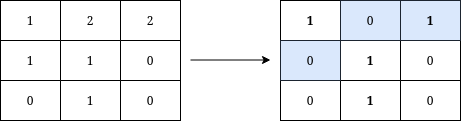
Input: grid = [[1,2,2],[1,1,0],[0,1,0]]
Output: 3
Explanation: We can write Y on the grid by applying the changes highlighted in blue in the image above. After the operations, all cells that belong to Y, denoted in bold, have the same value of 1 while those that do not belong to Y are equal to 0.
It can be shown that 3 is the minimum number of operations needed to write Y on the grid.
Example 2
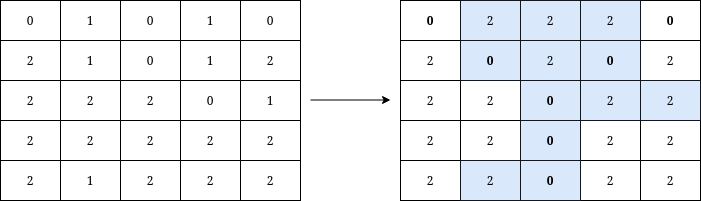
Input: grid = [[0,1,0,1,0],[2,1,0,1,2],[2,2,2,0,1],[2,2,2,2,2],[2,1,2,2,2]]
Output: 12
Explanation: We can write Y on the grid by applying the changes highlighted in blue in the image above. After the operations, all cells that belong to Y, denoted in bold, have the same value of 0 while those that do not belong to Y are equal to 2.
It can be shown that 12 is the minimum number of operations needed to write Y on the grid.